Five Tools. One Menu Bar. Pure Productivity.
Complete productivity suite for macOS. Window snapping (14 Aero Snap layouts), AI clipboard history, Calendar & meeting intelligence, OCR text extraction, and power tweaks—all in one native Swift menu bar app. No subscriptions. No bloat. Just productivity.
Native Swift
100% Private
One-Time Fee
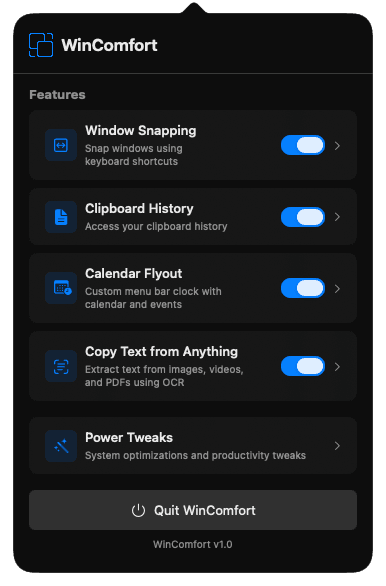
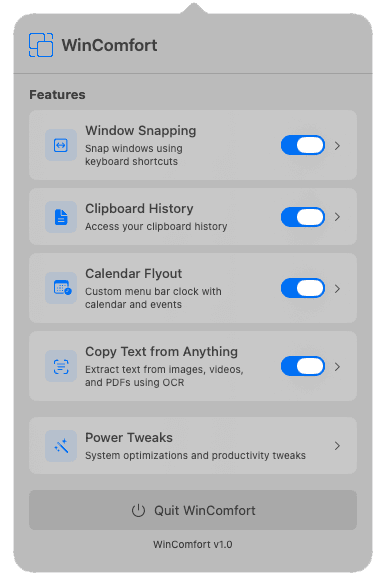
Productivity Features That Just Work
A simple, native-feeling showcase of your favorite tools — with smooth, automatic slides.
Window Snapping
Organize windows instantly with Windows-style keyboard shortcuts. 14 snap positions including halves, thirds, quarters, and two-thirds layouts.
Ctrl + Opt + ← / →Left Snap
Right Snap
Window Snapping (14 Layouts)
Windows Aero Snap comes to macOS—refined and optimized. Accessibility API-based engine with physics-based animations and multi-monitor intelligence. Your Windows muscle memory works on Mac.
Grid-Based Snapping
Arrange windows into your ideal layout instantly. Choose from Halves, Thirds, Quarters, or Two-Thirds layouts. Smooth 150ms animations feel premium and responsive. Multi-monitor support ensures perfect snapping on any display configuration.
- Snap Left: Ctrl + Opt + ← (fills left 50%)
- Snap Right: Ctrl + Opt + → (fills right 50%)
- Maximize: Ctrl + Opt + ↑ (full screen)
- Restore: Ctrl + Opt + ↓ (original size)
14 snap positions | Smooth animations | Accessibility APIAI-Powered Clipboard History
Never lose what you copy. Intelligent clipboard history with smart deduplication, AI-powered categories, semantic search, and strict privacy. Automatically skips passwords. Set once, forget forever.
- Stores text, images, and rich content
- Automatically skips passwords & sensitive data
- AI-powered categories and semantic search
- Efficient polling with Battery Saver Mode
Cmd + Shift + V100% Menu Bar Utility: Lives in your menu bar with no Dock icon. Built entirely in Swift. No Electron, no web tech overhead. Instant, private, and deeply integrated with macOS.
Calendar, OCR & Power Tweaks
Intelligent tools that complete the productivity suite—Calendar flyout with meeting intelligence, instant OCR capture, and power tweaks that enhance macOS. All backgrounded efficiently with Battery Saver Mode.
Calendar & Meeting Intelligence
Menu bar flyout with 3-day agenda, countdown timers, and world clock. Auto-detects Zoom/Teams/Meet links for one-click join. Smart meeting briefs powered by Apple Intelligence (with fallback on older systems).
- Auto-detects Zoom, Teams, and Meet links
- One-click join with instant connection
- 3-day agenda and countdown timers
- World clock and customizable date formats
Click menu bar iconCopy Text from Anything (OCR)
Extract text from images, PDFs, screenshots, or any content with Cmd+Shift+O. Powered by Apple Vision framework with adjustable recognition speed (fast/balanced/accurate). Text lands straight in clipboard history. 100% on-device.
- Region selection or full-screen capture
- Adjustable recognition speed (fast/balanced/accurate)
- Automatic language correction and orientation fix
- 100% on-device processing with no uploads
Cmd + Shift + OPower Tweaks
Keep Awake prevents sleep, and Global Mic Mute toggles microphone with a hotkey. Battery Saver Mode intelligently throttles timers and animations when battery is low.
- Keep Awake prevents unwanted sleep
- Global Mic Mute for instant audio control
- Hide desktop icons (Cmd+Shift+D) — overlay wallpaper, multi-monitor support
- Intelligent Battery Saver Mode for low-power situations
Toggle in app menuApple Intelligence Integration
On supported systems, WinComfort uses Apple Intelligence (on-device Foundation Models) to enhance Calendar event analysis and clipboard categorization—while keeping processing local. Seamless fallback on older systems.
Smart Categorization
Automatically analyzes and categorizes your clipboard items: URLs, code snippets, emails, contacts, prices, dates, addresses, and phone numbers.
Semantic Search
Finds what you need even if you don't remember exactly what you copied. Intelligent scoring based on content type, entities, and fuzzy matching.
Entity Extraction
Automatically identifies and tags people, places, and organizations in your clipboard history for smarter searching.
Adaptive availability: Uses Apple Intelligence when supported and available; otherwise falls back to deterministic heuristics. Core features (including Calendar) continue to work normally.
Data Sovereignty: All OCR, AI analysis, and text processing happen 100% on-device. No data is ever sent to the cloud.
Privacy & Security First
Built on trust. No tracking. No cloud. No compromise on your privacy.
100% Offline
WinComfort runs entirely on your Mac. No servers. No cloud syncing of personal data. No analytics tracking. Ever.
Password Safe
Automatically detects and skips password manager entries (1Password, Keychain). Sensitive data never enters the clipboard history.
Pure Native Code
Written entirely in Swift. No Electron. No web technologies. Instant startup, zero overhead, exceptional battery efficiency.
Why Privacy Matters
- Local Storage: Clipboard history stored only on your Mac. Settings sync via iCloud with end-to-end encryption.
- Minimal Permissions: Only accesses Accessibility for window snapping, Calendar for meeting detection, and Microphone when using Global Mic Mute. Full transparency.
- Efficient Background: Lightweight Swift implementation sleeps efficiently. Minimal CPU and memory footprint.
- One-Time Purchase: No subscriptions. No recurring charges. No ads. You own WinComfort forever.
Why Choose WinComfort?
Five integrated tools. One menu bar app. Smarter than buying five separate utilities.
Better Value
One-time purchase for five productivity tools. No subscriptions. No recurring fees. Ever. Competitors charge $5-10/month per tool or require constant updates.
True Performance
Native Swift code means instant startup, zero web overhead, and exceptional battery life. Not an Electron app pretending to be Mac software. Menu bar utility with no Dock icon.
Your Privacy
100% offline. No tracking. No data collection. No cloud. No shell commands. App Store-compliant with public APIs only. Your data stays on your Mac—period.
Built for Windows Users
Made by someone who switched. Every feature answers: Why can't Mac do this? Window snapping muscle memory transfers instantly. Keyboard shortcuts match Windows exactly.
Seamless Sync
All settings sync automatically across your Macs via iCloud with end-to-end encryption. Change a setting on your MacBook, see it instantly on your iMac. Clipboard history stays local.
Apple Intelligence
Uses Apple Intelligence (when supported) to enhance Calendar event analysis and clipboard categorization—private by design, with smart fallbacks on older systems. All processing on-device.
Five tools. One menu bar. One price. Forever.
Frequently Asked Questions
Everything you need to know.
Stop Missing Windows. Start Loving Mac.
WinComfort makes macOS feel right—for Windows users. Window snapping, clipboard history, smart tools. All native. All private.
macOS 15.1+ | One-time purchase | No subscriptions
Also Works with LiquidGlass
WinComfort is fully compatible with LiquidGlass. Combine both utilities for the ultimate Windows-to-Mac transition experience. All your favorite tools in one place.